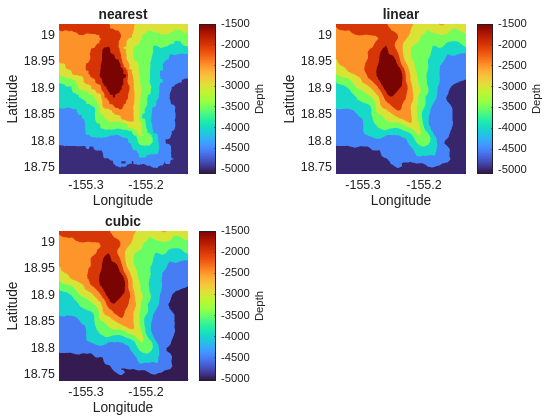
In regularizeNd practice, interpolation and solver are two separate decisions:
interpolation is mainly about local shape,
solver is mainly about numerical robustness, speed, and memory.
The key solver takeaway from project guidance is simple:
\ is usually the most robust fallback,
normal is usually about 3x faster than \ when conditioning is acceptable, which is 99.9% of the time.
Suggested Walkthrough
Fix data and grid.
Run selected solver configurations.
Compare run time, stability, and output shape.
Keep notes on conditioning-sensitive settings.
Interpolation Modes in Practice
Nearest
Fastest local interpolation rule.
Most blocky output.
Useful as a coarse baseline and for sanity checks.
Rarely, rarely used in practice for final output because it can miss important local trends and create artificial discontinuities.
Linear
Usually the best default for reliability and speed-quality balance.
Piecewise-linear local behavior often avoids overshoot artifacts.
Good starting point for engineering lookup tables.
Extremum are always at grid points, which can be desirable for some applications.
It’s the most consistent with the regularization meaning a true linear underlying function has no regularization penalty.
Cubic
Smoother local appearance and gradients.
Wider local stencil increases coupling and can increase runtime.
More sensitive to sparse/noisy regions; use only when you need smoother local derivatives.
Extremum can be between grid points, which can be desirable for some applications but also can lead to overshoot artifacts.
Interpolation Comparison Run
Use one fixed dataset and only change interpolation mode to see differences. The timing difference do not approach their asymptotic complexity differences because the problem size is small, but you should see some difference in output shape.
normal  runtime: 1.146 s
\       runtime: 2.885 s
pcg     runtime: 13.404 s
symmlq  runtime: 12.943 s
lsqr    runtime: 64.713 s
Decision Rules
Start here, then refine:
Use linear interpolation and smoothness = 1e-4 as a neutral baseline for this dataset. 1e-3 is the most common starting point across most datasets. This data set contains a lot of data and therefore can use smaller smoothness relying on the local high fidelity data to control the fit. If you have less data, you may need more smoothness to get a good fit.
Try normal first when no rank/conditioning warnings appear (99.9% of the time). Lowering the smoothness far enough will trigger warnings, which is a sign to switch to \ for robustness.
Switch to \ when robustness is more important than speed.
Switch to iterative pathways when matrix size pushes memory or direct-factorization cost too high. For this dataset, the direct solvers are fast and the iterative solvers are slow. The problem size is not yet large enough that the iterative solvers are competitive, but this will change as you increase the grid size.
Common Failure Modes
Overfitting appears as local wiggles despite visually smooth broad trend.
Ill-conditioning appears as unstable runtimes, warnings, or wildly different fits from small option changes.
Solver mismatch appears as long runtime with no quality gain.
Checklist Before Moving On
You recorded at least one solver runtime sweep on the same data/grid.
You compared the results across the different solvers.
Key Point
Interpolation choice should be based on output behavior and accuracy needs, not only local computational complexity.