Why this guide exists
Fork is a fast, polished Git GUI available for Windows and macOS — but not Linux. This post documents how to run Fork 2.16.1 on Linux under Wine, including binary patches and native DLL stubs required to bypass WinRT, WPF text formatting, and spell check code that Wine Mono cannot handle.
All scripts are in the fork-wine-setup repo. Clone it and run setup.sh for a fully automated setup (the installer is downloaded directly from Fork’s CDN), or follow the manual steps below.
Note: Fork is commercial software ($59.99 one-time). You need a valid license. The patches here are interoperability modifications to run Fork on Linux under Wine — they do not bypass licensing.
Tested on Pop!_OS 22.04 (Ubuntu based) with wine-staging 11.6 and Fork 2.16.1.
AI did most of the work in this post and setup.
While Fork runs under Wine, I am not sure its going to last. We will see.
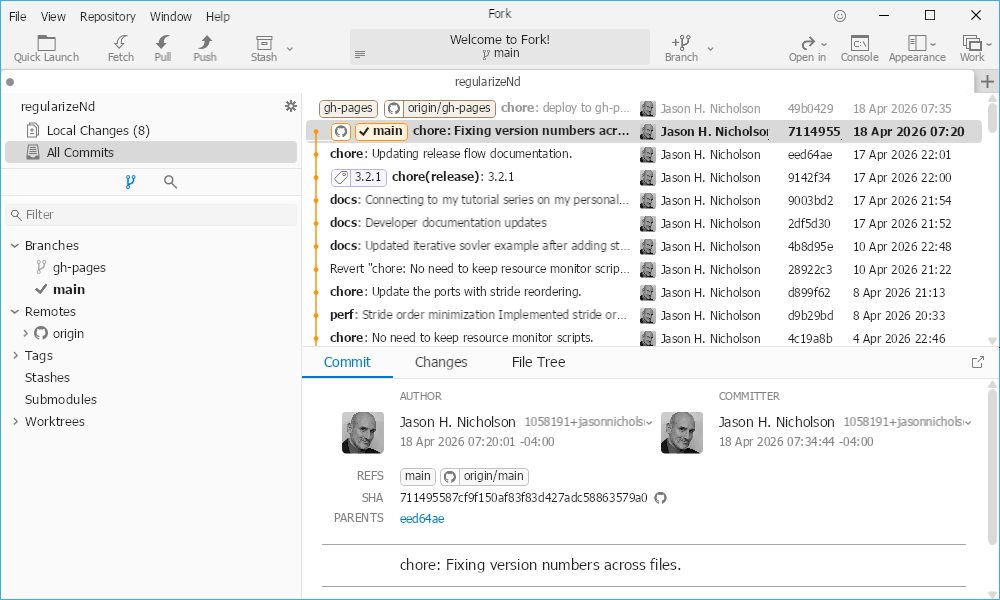
Running Fork on Linux under Wine
Overview
Fork is a .NET Framework 4.7.2 WPF application (64-bit). Getting it running under Wine requires:
- A clean WineHQ staging install (no mixed distro packages).
- .NET Framework 4.7.2 installed in the prefix.
- Windows fonts (corefonts, Tahoma, Consolas) and Segoe UI font substitution.
- WinRT SDK contract metadata files placed next to Fork.exe.
- A stub
NaturalLanguage6.dlland Wine Mono DLL map patch for spell check. - A binary patch to seven methods that trigger Wine Mono incompatibilities.
- A Wine-specific
.gitconfigwith line ending overrides. - A git LFS repo to detect when the auto-updater replaces patched files.
Prerequisites
- Ubuntu/Pop!_OS (or similar apt-based distro)
- 64-bit and 32-bit architecture enabled
- Python 3 with the
dnfilepackage (pip install dnfile) mingw-w64for building the NaturalLanguage6 stub (sudo apt install mingw-w64)
Step 1: Install a consistent Wine stack
Do not mix old distro Wine packages with WineHQ packages. A mixed stack is a major instability source.
sudo dpkg --add-architecture i386
sudo mkdir -pm755 /etc/apt/keyrings
sudo wget -O /etc/apt/keyrings/winehq-archive.key \
  https://dl.winehq.org/wine-builds/winehq.key
sudo wget -NP /etc/apt/sources.list.d/ \
  https://dl.winehq.org/wine-builds/ubuntu/dists/jammy/winehq-jammy.sources
sudo apt update

# Remove old distro wine packages if present
sudo apt remove -y wine64 wine32 libwine:amd64 libwine:i386 || true

# Install one coherent WineHQ line
sudo apt install -y --install-recommends winehq-staging
Verify:
wine --version
# wine-11.6 (Staging)
Step 2: Get the latest winetricks
The distro winetricks may be too old.
mkdir -p "$HOME/.local/bin"
curl -fsSL https://raw.githubusercontent.com/Winetricks/winetricks/master/src/winetricks \
  -o "$HOME/.local/bin/winetricks-latest"
chmod +x "$HOME/.local/bin/winetricks-latest"
Step 3: Create an isolated 64-bit prefix
export WINEPREFIX="$HOME/.wine-fork"
export WINEARCH=win64
wineboot -u
Set Windows 10 mode and install fonts:
"$HOME/.local/bin/winetricks-latest" -q win10 corefonts tahoma consolasFork’s WPF UI expects Segoe UI, which is not redistributable. Register Tahoma as a substitute:
WINEPREFIX="$HOME/.wine-fork" wine reg add \
  'HKCU\Software\Wine\Fonts\Replacements' /v 'Segoe UI' /t REG_SZ /d 'Tahoma' /f
WINEPREFIX="$HOME/.wine-fork" wine reg add \
  'HKCU\Software\Wine\Fonts\Replacements' /v 'Segoe UI Semibold' /t REG_SZ /d 'Tahoma' /f
WINEPREFIX="$HOME/.wine-fork" wine reg add \
  'HKCU\Software\Wine\Fonts\Replacements' /v 'Segoe UI Light' /t REG_SZ /d 'Tahoma' /f
Step 4: Install .NET Framework 4.7.2
The winetricks dotnet472 verb can stall. If it does, use the direct installer:
export WINEPREFIX="$HOME/.wine-fork"

# Try winetricks first
"$HOME/.local/bin/winetricks-latest" -q dotnet472

# If that stalls, download and run directly:
# curl -L -o /tmp/NDP472-KB4054530-x86-x64-AllOS-ENU.exe \
#   https://download.visualstudio.microsoft.com/download/pr/158dce74-251c-4af3-b8cc-4608621341f8/9c1e178a11f55478e2112714a3897c1a/ndp472-kb4054530-x86-x64-allos-enu.exe
# wine /tmp/NDP472-KB4054530-x86-x64-AllOS-ENU.exe /q /norestart
Verify .NET is installed:
wine reg query "HKLM\\Software\\Microsoft\\NET Framework Setup\\NDP\\v4\\Full" /v Release
# Should show 0x82348 (461808) for 4.7.2
Step 5: Install Fork
Fork uses a Velopack installer. The correct silent flag is --silent (not /VERYSILENT or /S).
export WINEPREFIX="$HOME/.wine-fork"
# Download the installer from Fork's CDN
curl -fL -o /tmp/Fork-2.16.1.exe https://cdn.fork.dev/win/Fork-2.16.1.exe

wine /tmp/Fork-2.16.1.exe --silent
Fork installs to:
$WINEPREFIX/drive_c/users/$USER/AppData/Local/Fork/current/Fork.exeStep 6: Install WinRT SDK contracts and runtime DLL
Fork’s theme system uses Windows Runtime (WinRT) APIs to detect light/dark mode. Wine does not ship the WinRT metadata files, so the CLR cannot resolve these types. We provide them from the official NuGet packages.
export WINEPREFIX="$HOME/.wine-fork"
FORK_DIR="$WINEPREFIX/drive_c/users/$USER/AppData/Local/Fork/current"

# Download WinRT SDK contracts
curl -sL -o /tmp/sdk-contracts.nupkg \
  "https://www.nuget.org/api/v2/package/Microsoft.Windows.SDK.Contracts/10.0.22621.755"
mkdir -p /tmp/sdk-contracts
unzip -o /tmp/sdk-contracts.nupkg -d /tmp/sdk-contracts

# Copy all .winmd files as .dll next to Fork.exe
for f in /tmp/sdk-contracts/ref/netstandard2.0/*.winmd; do
    base=$(basename "$f" .winmd)
    cp "$f" "$FORK_DIR/${base}.dll"
done

# Download System.Runtime.WindowsRuntime interop DLL
curl -sL -o /tmp/winrt-runtime.nupkg \
  "https://www.nuget.org/api/v2/package/System.Runtime.WindowsRuntime/4.7.0"
mkdir -p /tmp/winrt-runtime
unzip -o /tmp/winrt-runtime.nupkg -d /tmp/winrt-runtime
cp /tmp/winrt-runtime/lib/netstandard2.0/System.Runtime.WindowsRuntime.dll "$FORK_DIR/"
This provides the type metadata so the CLR can load the assemblies. However, the actual WinRT runtime objects (like UISettings) do not exist under Wine, so we also need binary patches and a native DLL stub.
Step 7: Build and install the NaturalLanguage6 stub DLL
Wine Mono’s WPF spell checker calls NlLoad, NlUnload, etc. via P/Invoke. These functions are mapped to PresentationNative_cor3.dll by Mono’s DLL map, but that DLL does not export them. On real Windows they live in NaturalLanguage6.dll, which does not exist under Wine.
We need two things: a stub DLL that exports the Nl* functions as no-ops, and a Mono DLL map patch to redirect those specific P/Invoke calls to our stub.
Build the stub:
cat > /tmp/nl6stub.c << 'EOF'
#include <windows.h>
BOOL WINAPI DllMain(HINSTANCE h, DWORD r, LPVOID p) { return TRUE; }
__declspec(dllexport) HRESULT WINAPI NlLoad(void) { return S_OK; }
__declspec(dllexport) void    WINAPI NlUnload(void) { }
__declspec(dllexport) HRESULT WINAPI NlGetClassObject(void *a, void *b, void *c) { return E_NOINTERFACE; }
__declspec(dllexport) HRESULT WINAPI NlCreateHyphenator(void *a, void **b) { if(b)*b=NULL; return E_NOINTERFACE; }
__declspec(dllexport) HRESULT WINAPI NlDestroyHyphenator(void *a) { return S_OK; }
__declspec(dllexport) HRESULT WINAPI NlHyphenate(void *a, void *b, int c, int d, void *e) { return S_OK; }
EOF
x86_64-w64-mingw32-gcc -shared -o /tmp/NaturalLanguage6.dll /tmp/nl6stub.c -Wl,--kill-at
Install the stub next to Fork.exe, in system32, and in Mono’s native lib directory:
export WINEPREFIX="$HOME/.wine-fork"
FORK_DIR="$WINEPREFIX/drive_c/users/$USER/AppData/Local/Fork/current"
MONO_LIB="$WINEPREFIX/drive_c/windows/mono/mono-2.0/lib/x86_64"

cp /tmp/NaturalLanguage6.dll "$FORK_DIR/"
cp /tmp/NaturalLanguage6.dll "$WINEPREFIX/drive_c/windows/system32/"
cp /tmp/NaturalLanguage6.dll "$MONO_LIB/"
Patch the Mono DLL map so the Nl* functions are redirected from PresentationNative_cor3.dll to our stub. Replace the contents of PresentationFramework.dll.config:
PF_CONFIG="$WINEPREFIX/drive_c/windows/mono/mono-2.0/lib/mono/gac/PresentationFramework/4.0.0.0__31bf3856ad364e35/PresentationFramework.dll.config"

cat > "$PF_CONFIG" << 'EOF'
<?xml version="1.0" encoding="utf-8"?>
<configuration>
    <dllmap dll="PresentationNative_cor3.dll" target="$mono_libdir\x86\PresentationNative_cor3.dll" os="windows" cpu="x86">
        <dllentry dll="NaturalLanguage6" name="NlLoad" target="NlLoad"/>
        <dllentry dll="NaturalLanguage6" name="NlUnload" target="NlUnload"/>
        <dllentry dll="NaturalLanguage6" name="NlGetClassObject" target="NlGetClassObject"/>
        <dllentry dll="NaturalLanguage6" name="NlCreateHyphenator" target="NlCreateHyphenator"/>
        <dllentry dll="NaturalLanguage6" name="NlDestroyHyphenator" target="NlDestroyHyphenator"/>
        <dllentry dll="NaturalLanguage6" name="NlHyphenate" target="NlHyphenate"/>
    </dllmap>
    <dllmap dll="PresentationNative_cor3.dll" target="$mono_libdir\x86_64\PresentationNative_cor3.dll" os="windows" cpu="x86-64">
        <dllentry dll="NaturalLanguage6" name="NlLoad" target="NlLoad"/>
        <dllentry dll="NaturalLanguage6" name="NlUnload" target="NlUnload"/>
        <dllentry dll="NaturalLanguage6" name="NlGetClassObject" target="NlGetClassObject"/>
        <dllentry dll="NaturalLanguage6" name="NlCreateHyphenator" target="NlCreateHyphenator"/>
        <dllentry dll="NaturalLanguage6" name="NlDestroyHyphenator" target="NlDestroyHyphenator"/>
        <dllentry dll="NaturalLanguage6" name="NlHyphenate" target="NlHyphenate"/>
    </dllmap>
</configuration>
EOF
Finally, register the Wine DLL override so Wine loads our native stub:
WINEPREFIX="$HOME/.wine-fork" wine reg add \
  'HKCU\Software\Wine\DllOverrides' /v NaturalLanguage6 /t REG_SZ /d native /f
Step 8: Patch Fork.exe to bypass Wine Mono crashes
Fork crashes in three areas under Wine Mono:
WinRT theme detection — Fork.UI.Theme.SubscribeToSystemEvents() subscribes to Windows theme change events via WinRT, and GetSystemBrush() queries system accent colors. Neither is possible under Wine because there is no WinRT runtime.
WPF text formatting — DiffLineNumberMargin.MeasureOverride() and OnRender() call FormattedText.Width and DrawingContext.DrawText, which trigger a NullReferenceException in Wine Mono’s LineServicesCallbacks.InlineFormat. This crashes Fork when the diff view is displayed.
WPF spell check — SpellingPlaceholderTextBox.RefreshSpellChecking() enables WPF spell check, which tries to instantiate NLGSpellerInterop. Even with our stub DLL, the speller COM object creation fails with an InvalidCastException. Since spell check is non-essential, we stub the method.
The patch makes seven methods into no-ops:
Theme.SubscribeToSystemEvents()→ret(skip event subscription)Theme.GetSystemBrush()→return fallback(use default brush)SystemThemeHelper.SubscribeToSystemEvents()→retSystemThemeHelper.GetSystemBrush()→return fallbackDiffLineNumberMargin.MeasureOverride()→return Size(50, 0)(fixed width)DiffLineNumberMargin.OnRender()→ret(skip drawing line numbers)SpellingPlaceholderTextBox.RefreshSpellChecking()→ret(disable spell check)
Fork uses its built-in theme colors, the diff line number gutter is hidden (the diff content itself still renders), and spell check is disabled.
Save this as patch_fork.py:
#!/usr/bin/env python3
"""Patch Fork.exe for Wine — all 7 methods in one script.

Patches:
  1. Theme.SubscribeToSystemEvents → ret
  2. Theme.GetSystemBrush → return fallback
  3. SystemThemeHelper.SubscribeToSystemEvents → ret
  4. SystemThemeHelper.GetSystemBrush → return fallback
  5. DiffLineNumberMargin.MeasureOverride → return Size(50, 0)
  6. DiffLineNumberMargin.OnRender → ret
  7. SpellingPlaceholderTextBox.RefreshSpellChecking → ret (disable spell check)
"""
import sys, shutil, struct, os

def rva_to_offset(sections, rva):
    for vaddr, vsize, raw_offset in sections:
        if vaddr <= rva < vaddr + vsize:
            return rva - vaddr + raw_offset
    return None

def get_sections(data):
    pe_offset = struct.unpack_from('<I', data, 0x3C)[0]
    num_sections = struct.unpack_from('<H', data, pe_offset + 6)[0]
    opt_hdr_size = struct.unpack_from('<H', data, pe_offset + 20)[0]
    section_offset = pe_offset + 24 + opt_hdr_size
    sections = []
    for i in range(num_sections):
        off = section_offset + i * 40
        vsize = struct.unpack_from('<I', data, off + 8)[0]
        vaddr = struct.unpack_from('<I', data, off + 12)[0]
        raw_offset = struct.unpack_from('<I', data, off + 20)[0]
        sections.append((vaddr, vsize, raw_offset))
    return sections

def read_method_header(data, offset):
    b = data[offset]
    if (b & 0x3) == 0x2:
        return offset + 1, b >> 2, False, 1
    elif (b & 0x3) == 0x3:
        hdr_size = (struct.unpack_from('<H', data, offset)[0] >> 12) * 4
        code_size = struct.unpack_from('<I', data, offset + 4)[0]
        return offset + hdr_size, code_size, True, hdr_size
    return None, None, None, None

def patch_noop(data, fo):
    co, cs, fat, hs = read_method_header(data, fo)
    if co is None: return False
    if fat:
        # Clear MoreSects flag (bit 3) and keep Fat format (0x3), InitLocals can stay
        old_flags = struct.unpack_from('<H', data, fo)[0]
        struct.pack_into('<H', data, fo, old_flags & ~0x08)
        struct.pack_into('<H', data, fo+2, 0)
        struct.pack_into('<I', data, fo+4, 1)
        struct.pack_into('<I', data, fo+8, 0)
        data[co] = 0x2A
        for i in range(1, cs): data[co+i] = 0
    else:
        data[fo] = 0x06; data[fo+1] = 0x2A
        for i in range(2, 1+cs): data[fo+i] = 0
    return True

def patch_return_arg(data, fo, ai):
    co, cs, fat, hs = read_method_header(data, fo)
    if co is None: return False
    il = bytes([0x02+ai, 0x2A]) if ai <= 3 else bytes([0x0E, ai, 0x2A])
    if fat:
        old_flags = struct.unpack_from('<H', data, fo)[0]
        struct.pack_into('<H', data, fo, old_flags & ~0x08)
        struct.pack_into('<H', data, fo+2, 1)
        struct.pack_into('<I', data, fo+4, len(il))
        struct.pack_into('<I', data, fo+8, 0)
        for i, b in enumerate(il): data[co+i] = b
        for i in range(len(il), cs): data[co+i] = 0
    else:
        data[fo] = (len(il) << 2) | 0x02
        for i, b in enumerate(il): data[fo+1+i] = b
        for i in range(len(il), cs): data[fo+1+i] = 0
    return True

def patch_return_size(data, fo, size_token, width=50.0):
    """Replace method body with: return new Size(width, 0.0)"""
    co, cs, fat, hs = read_method_header(data, fo)
    if co is None or not fat: return False
    if size_token is None:
        print("    WARNING: Could not find Size constructor token, using ret")
        return patch_noop(data, fo)
    new_il = bytearray()
    new_il += b'\x23' + struct.pack('<d', width)       # ldc.r8 width
    new_il += b'\x23' + struct.pack('<d', 0.0)         # ldc.r8 0.0
    new_il += b'\x73' + struct.pack('<I', size_token)  # newobj Size
    new_il += b'\x2a'                                  # ret
    struct.pack_into('<H', data, fo, 0x3003)  # Fat | InitLocals, no MoreSects
    struct.pack_into('<H', data, fo+2, 2)
    struct.pack_into('<I', data, fo+4, len(new_il))
    struct.pack_into('<I', data, fo+8, 0)
    for i, b in enumerate(new_il): data[co+i] = b
    for i in range(len(new_il), cs): data[co+i] = 0
    return True

def main():
    import dnfile
    fork_path = sys.argv[1] if len(sys.argv) > 1 else \
        os.path.expanduser("~/.wine-fork/drive_c/users/{}/AppData/Local/Fork/current/Fork.exe".format(
            os.environ.get("USER", os.environ.get("USERNAME", "user"))))
    if not os.path.exists(fork_path):
        print(f"ERROR: {fork_path} not found")
        sys.exit(1)

    backup = fork_path + ".original"
    if not os.path.exists(backup):
        shutil.copy2(fork_path, backup)
        print(f"Backed up to: {backup}")
    else:
        print(f"Backup exists: {backup}")

    dn = dnfile.dnPE(fork_path)

    # WinRT theme methods
    theme_targets = {}
    for row in dn.net.mdtables.MethodDef:
        name = str(row.Name)
        if name in ("SubscribeToSystemEvents", "GetSystemBrush") and row.Rva > 0:
            theme_targets.setdefault(name, []).append(row.Rva)

    # DiffLineNumberMargin + SpellingPlaceholderTextBox
    diff_targets = {}
    spelling_target = None
    for trow in dn.net.mdtables.TypeDef:
        tname = str(trow.TypeName)
        if tname == 'DiffLineNumberMargin':
            for idx_obj in trow.MethodList:
                mrow = idx_obj.row
                mname = str(mrow.Name)
                if mname in ('MeasureOverride', 'OnRender') and mrow.Rva > 0:
                    diff_targets[mname] = mrow.Rva
        elif tname == 'SpellingPlaceholderTextBox':
            for idx_obj in trow.MethodList:
                mrow = idx_obj.row
                if str(mrow.Name) == 'RefreshSpellChecking' and mrow.Rva > 0:
                    spelling_target = mrow.Rva

    # Find Size(double,double) ctor token from MemberRef table
    size_ctor_token = None
    for i, row in enumerate(dn.net.mdtables.MemberRef):
        if str(row.Name) == '.ctor':
            cls = row.Class
            if cls and hasattr(cls, 'row') and hasattr(cls.row, 'TypeName'):
                if str(cls.row.TypeName) == 'Size' and \
                   str(getattr(cls.row, 'TypeNamespace', '')) == 'System.Windows':
                    size_ctor_token = (0x0A << 24) | (i + 1)
                    break

    data = bytearray(open(fork_path, 'rb').read())
    sections = get_sections(data)
    count = 0

    for name, rvas in theme_targets.items():
        for rva in rvas:
            fo = rva_to_offset(sections, rva)
            if fo is None: continue
            if name == "SubscribeToSystemEvents":
                ok = patch_noop(data, fo)
            else:
                ok = patch_return_arg(data, fo, 1)
            print(f"  {'OK' if ok else 'FAIL'}: {name} @ RVA 0x{rva:08x}")
            if ok: count += 1

    for mname, rva in diff_targets.items():
        fo = rva_to_offset(sections, rva)
        if fo is None: continue
        if mname == 'MeasureOverride':
            ok = patch_return_size(data, fo, size_ctor_token, width=50.0)
        else:
            ok = patch_noop(data, fo)
        print(f"  {'OK' if ok else 'FAIL'}: DiffLineNumberMargin.{mname} @ RVA 0x{rva:08x}")
        if ok: count += 1

    if spelling_target:
        fo = rva_to_offset(sections, spelling_target)
        if fo is not None:
            ok = patch_noop(data, fo)
            print(f"  {'OK' if ok else 'FAIL'}: SpellingPlaceholderTextBox.RefreshSpellChecking")
            if ok: count += 1

    open(fork_path, 'wb').write(data)
    print(f"Patched {count} methods. Original saved as {backup}")

if __name__ == '__main__':
    main()
Run the patcher:
pip install dnfile  # if not already installed
python3 patch_fork.py "$WINEPREFIX/drive_c/users/$USER/AppData/Local/Fork/current/Fork.exe"
Step 9: Disable automatic updates
After first launch, open File → Preferences and disable automatic updates. Fork’s updater will replace Fork.exe and other files with unpatched copies, requiring you to re-run the patcher. Even with auto-update disabled, Fork may still update itself — see Step 11 for how to detect this.
If Fork downloads an update, you can find it in the packages/ directory. Delete the update otherwise it will try update after every time you restart Fork even with automatic updates disabled.
Step 10: Configure Git for Wine with line ending overrides
Fork uses its bundled Windows git.exe, which reads .gitconfig from the Wine user’s home directory. Rather than symlinking to your Linux config (which would share core.autocrlf settings), create a Wine-specific config that includes your Linux settings and overrides line endings:
cat > "$WINEPREFIX/drive_c/users/$USER/.gitconfig" << 'EOF'
[include]
    path = Z:/home/$USER/.gitconfig

[core]
    autocrlf = false
    eol = lf
    filemode = false
EOF

# Fix the literal $USER in the include path
sed -i "s|\$USER|$USER|g" "$WINEPREFIX/drive_c/users/$USER/.gitconfig"
This pulls in your Linux config (user name, email, credentials, LFS filters) via Wine’s Z: drive mapping, then overrides three settings: core.autocrlf=false and core.eol=lf so Fork’s Windows git does not convert line endings, and core.filemode=false so it ignores Unix execute-bit differences (Wine’s git.exe cannot read Unix permissions, so without this every .exe and .dll appears modified). Your repos live on a Linux filesystem and should stay LF.
Step 11: Initialize a git LFS repo to track updater changes
Fork’s auto-updater can silently replace your patched files. A git repo with LFS tracks these binaries so you can detect changes with git status and recover with git checkout.
Initialize the repo in the Fork/ directory (one level above current/) so it also tracks Update.exe, settings.json, and other files the updater may touch:
cd "$WINEPREFIX/drive_c/users/$USER/AppData/Local/Fork"
git init
git config core.filemode false
git lfs install
git lfs track "*.dll" "*.exe" "*.config" "*.winmd" "*.json"

cat > .gitignore << 'EOF'
gitInstance/
packages/
logs/
velopack.log
EOF

git add -A
git commit -m "Fork patched for Wine (7 patches applied)"
After any Fork launch, check for updater tampering:
cd "$WINEPREFIX/drive_c/users/$USER/AppData/Local/Fork" && git statusIf files changed, restore and re-patch:
git checkout -- .
python3 patch_fork.py
Step 12: Launch Fork
Create a launch script at ~/.local/bin/fork that logs Wine errors and reports crashes:
#!/usr/bin/env bash
set -euo pipefail

export WINEPREFIX="${WINEPREFIX:-$HOME/.wine-fork}"
export WINEDLLOVERRIDES="NaturalLanguage6=n"
export WINEDEBUG=err+all,fixme-all

FORK_EXE="$WINEPREFIX/drive_c/users/$USER/AppData/Local/Fork/current/Fork.exe"
LOG_DIR="${XDG_STATE_HOME:-$HOME/.local/state}/fork"
mkdir -p "$LOG_DIR"
LOG_FILE="$LOG_DIR/fork-$(date +%Y%m%d-%H%M%S).log"

# Keep only the 10 most recent logs
find "$LOG_DIR" -maxdepth 1 -name 'fork-*.log' -printf '%T@ %p\n' 2>/dev/null \
  | sort -rn | tail -n +11 | cut -d' ' -f2- | xargs -r rm --

# Fork's biturbo.dll resolves License/Fork.exe relative to CWD
cd "$(dirname "$FORK_EXE")"

set +e
wine "$FORK_EXE" "$@" 2>"$LOG_FILE"
EXIT_CODE=$?
set -e

if [[ $EXIT_CODE -ne 0 ]]; then
    echo "Fork exited with code $EXIT_CODE — log: $LOG_FILE" >&2
    echo "Last 20 lines:" >&2
    tail -20 "$LOG_FILE" >&2
fi

exit "$EXIT_CODE"
chmod +x ~/.local/bin/forkThen just run fork from any terminal. WINEDEBUG=err+all,fixme-all captures all Wine error messages while suppressing the noisy fixme spam. Each session writes a timestamped log to ~/.local/state/fork/, auto-rotating to keep only the 10 most recent. On a non-zero exit, the script prints the exit code and last 20 lines of the log to stderr.
How the patch works
Fork’s Fork.UI.Theme class calls WinRT APIs at startup to subscribe to Windows dark/light mode changes and query system accent colors. The call chain is:
Fork.App.OnStartup()
  → Fork.App.InitializeTheme()
    → Fork.UI.Theme.SubscribeToSystemEvents()   ← uses UISettings.add_ColorValuesChanged
  → Fork.App.RefreshWindowBorderBrush()
    → Fork.UI.Theme.Refresh()
      → Fork.UI.Theme.GetSystemBrush()          ← uses UISettings.GetColorValue
Wine Mono can load the WinMD type metadata, but there is no actual WinRT runtime to activate Windows.UI.ViewManagement.UISettings. Additionally, Wine Mono’s WPF FormattedText implementation has a null reference bug in LineServicesCallbacks.InlineFormat that crashes when Fork’s diff line number margin tries to measure or draw text. Finally, WPF’s spell checker tries to P/Invoke NlLoad/NlUnload from NaturalLanguage6.dll (mapped to PresentationNative_cor3.dll by Wine Mono), which does not export these functions.
The patch replaces seven methods with trivial IL:
| Method | Original behavior | Patched behavior |
|---|---|---|
Theme.SubscribeToSystemEvents |
Subscribe to WinRT color change events | ret (no-op) |
Theme.GetSystemBrush |
Query WinRT for system accent color | return fallback argument |
SystemThemeHelper.SubscribeToSystemEvents |
Same as above | ret (no-op) |
SystemThemeHelper.GetSystemBrush |
Same as above | return fallback argument |
DiffLineNumberMargin.MeasureOverride |
Measure text width via FormattedText |
return Size(50, 0) |
DiffLineNumberMargin.OnRender |
Draw line numbers via DrawingContext.DrawText |
ret (no-op) |
SpellingPlaceholderTextBox.RefreshSpellChecking |
Enable WPF spell check | ret (no-op) |
Additionally, Wine Mono’s WPF spell checker P/Invokes NlLoad/NlUnload/etc. into PresentationNative_cor3.dll, which does not export those functions. The fix has two parts: a mingw-compiled stub NaturalLanguage6.dll that exports no-op implementations, and a <dllentry> patch to PresentationFramework.dll.config that redirects those specific P/Invoke calls to the stub.
The original Fork.exe is preserved as Fork.exe.original.
Automated setup
All of the manual steps above are automated in the fork-wine-setup repo:
git clone https://github.com/jasonnicholson/fork-wine-setup.git
cd fork-wine-setup
./setup.sh
The repo contains:
setup.sh— full automated setup (prefix creation, .NET 4.7.2, fonts, Fork install, WinRT stubs, NL6 stub, binary patching, git config, LFS tracking)patch_fork.py— the dnfile-based binary patcher (7 methods)fork— launch script for~/.local/bin/Fork-2.16.1.exeis downloaded from Fork’s CDN during setup (not included in the repo)
After setup.sh completes, install the launch script:
cp fork ~/.local/bin/fork
chmod +x ~/.local/bin/fork
Stabilization checklist
- One app per prefix for complex .NET GUI apps.
- Pin one Wine channel (staging or stable). Never mix package families.
- Disable automatic updates in Fork (File → Preferences). Updates replace the patched
Fork.exe. - Use the git LFS repo (
git status) to detect when the updater replaces files. - Do not upgrade the prefix in-place after major Wine changes.
- Back up the prefix once working:
tar -C "$HOME" -czf wine-fork-prefix.tar.gz .wine-fork - If you do update Fork, restore with
git checkout -- .and re-run the patcher.
Troubleshooting
Error: .NET Framework v4.7.2 required
export WINEPREFIX="$HOME/.wine-fork"
"$HOME/.local/bin/winetricks-latest" -q dotnet472
If winetricks stalls, use the direct installer with /q /norestart.
Error: Windows.Foundation.UniversalApiContract missing
You skipped Step 6. The WinRT SDK contract DLLs must be placed next to Fork.exe.
Error: System.Runtime.WindowsRuntime missing
You need the System.Runtime.WindowsRuntime.dll from the NuGet package in Step 6.
Error: UISettings.GetColorValue / add_ColorValuesChanged
You skipped Step 7. The binary patch is required because Wine has no WinRT runtime.
Fork is 64-bit only
Fork.exe is a 64-bit binary. It will not run in a win32 prefix (“Bad EXE format”). Use WINEARCH=win64.
Mixed Wine packages
If you see crashes from mismatched Wine libraries, remove all distro wine* and libwine* packages, then install only from WineHQ.
NullReferenceException in LineServicesCallbacks.InlineFormat
This is a Wine Mono bug in WPF text formatting. The patcher handles it by stubbing out DiffLineNumberMargin.MeasureOverride and OnRender. If a different FormattedText call site triggers the same crash, the same technique applies: find the calling method with dnfile and patch it to skip the FormattedText call.
EntryPointNotFoundException: NlUnload
Wine Mono’s WPF maps NlUnload (and other Nl* functions) to PresentationNative_cor3.dll, which does not export them. You need the NaturalLanguage6.dll stub and the PresentationFramework.dll.config DLL map patch from Step 7.
XamlParseException: SpellingPlaceholderTextBox
Fork’s SpellingPlaceholderTextBox tries to enable WPF spell check at construction time. Even with the NaturalLanguage6 stub, the WPF spell checker’s COM interop fails under Wine. The patcher stubs out RefreshSpellChecking() to skip it entirely. Spell check is non-functional under Wine anyway.
Black Preferences dialog
The Preferences dialog may appear as a black rectangle. This is a cosmetic Wine Mono WPF rendering issue. Press Escape to dismiss it; the settings are saved correctly.
Fork auto-updated despite disabling updates
Fork’s updater can replace files even after disabling auto-update. Use the git LFS repo from Step 11 to detect changes (git status) and recover (git checkout -- . then re-run the patcher).
Summary
Fork 2.16.1 runs on Linux with wine-staging 11.6 after providing WinRT metadata stubs, a NaturalLanguage6 native DLL stub, a Mono DLL map patch, and patching seven methods — four for WinRT theme detection, two for a Wine Mono WPF text formatting bug, and one for WPF spell check. The patches disable Windows dark/light mode detection (irrelevant under Wine), stub out diff line number rendering, and disable spell check. The patcher finds methods by name from the .NET metadata tables, not hardcoded offsets. The main diff viewer and all core Git operations are unaffected.
The full setup is automated in the fork-wine-setup repo — clone it, run setup.sh, and launch with fork.